
Python List is a collection of different elements that are grouped under an object. This object denotes a list in Python. In Python, Lists are denoted with a special keyword called list and are enclosed within [ ] (big brackets).
[1, 2, 3],
[1, “hey”, [1,2]],
[],
[[]], are all valid Python Lists.
Additionally, We can also use list() to typecast any iterable object to a list. Like below,
s = "cog" # string
n = {10} # set
t = (4, 5,) # tuple
print(list(s)) # string -> list
print(list(n)) # set -> list
print(list(t)) # tuple -> list
O/P
[‘c’, ‘o’, ‘g’]
[10]
[4, 5]
Generally, Python List also works in a similar fashion as traditional arrays, but the major difference between Python List and an Array is that : Python List can contain elements of different datatypes whereas an array can only contain similar type of elements.
Length of a Python List
Length of a Python List signifies the number of elements in that particular list. We can use the len() function to find the length of a list.
l = [3, "hello", "nice", 4]
print(len(l)) # prints 4
Indexing in Python Lists

Indexing in Python lists is same as in Python Strings, starting with 0 to len(lst)-1.
Python Lists also supports negative indexing, starting from -1 to len(lst). So,
lst[0] will give us 10,
lst[1] will give us “hello”,
Similarly, lst[-2] will give us 30.
Python Lists are mutable
A mutable object is an object whose content (data stored in that object) can be changed. If we talk about Python specifically, we have list, set, dictionary, user defined classes as mutable objects.
Python Lists are mutable, this means that we can modify the data inside a Python list. Let’s see how,
lst = [10, “hello”, 30, 50]
print("List before modification", lst)
lst[1] = 3 # modifying second element from left
lst[-2] = 60 # modifiying second element from right
print("List after modification", lst)
O/P
List before modification [10, ‘hello’, 30, 50]
List after modification [10, 3, 60, 50]
From the output, it is evident that we were able to modify the content of the given list with our own values, this defines the mutability concept of Python list.
Traversing a Python List
Traversal, in simpler words, means to visit each element of the given list one by one.
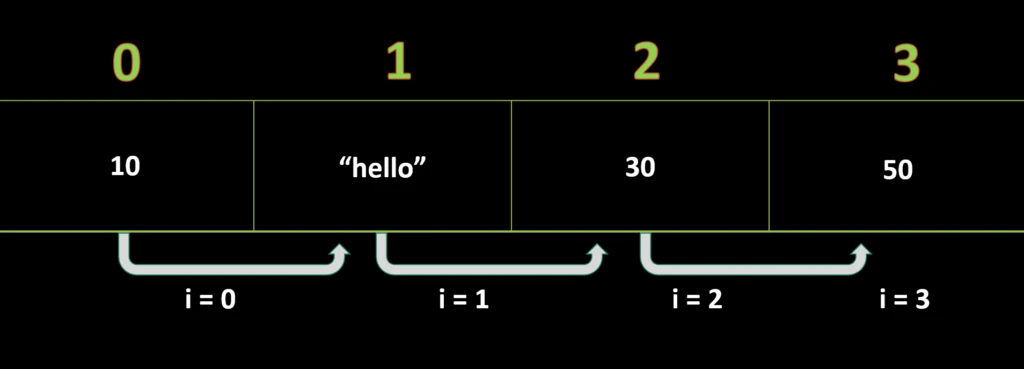
In Python Lists, traversal can be done in two ways :
1. for loop
2. while loop
Traversing list using for loop
Program : To traverse a given list of items using for loop.
planets = ['mercury', 'venus', 'earth', 'mars']
for each_planet in planets:
    print(each_planet, end=' ')
O/P :
mercury venus earth mars
Here, variable ‘each_planet’ is acting as a list element (iterator).
We can also iterate over a given sequence using range() function within the for loop.
range() function in Python is used to generate a sequence or series of numbers, starting from 0, ending just before the given limit and increments by 1. These are the default values which can be changed as per the requirements.
Syntax
range(start, end+1, step_size)
start : This signifies the starting point of the sequence.
end : This signifies the ending point of the sequence.
step_size : This signifies the value with which each digit of sequence will either increase or decrease.
Like, in series 2, 4, 6, 8, we have two as a step size.
Below are the different ways in which range() function can be used :
1. range(n) : We will use this when we want to generate a sequence of numbers from 0 to n-1, keeping 1 as step size.
2. range(0, 10) : We will use this when we want to generate a sequence of numbers from 0 to 9, keeping 1 as step size.
3. range(0, 10, 2) : We will use this when we want to generate a sequence of numbers from 0 to 9, keeping 2 as step size. This series will be as ‘0, 2, 4, 6, 8’.
4. range(10, 0, -1) : We will use this when we want to generate a sequence of numbers from 10 to 1,
Program : To traverse a given list of items using for loop (range).
planets = ['mercury', 'venus', 'earth', 'mars']
for i in range(0, len(planets)):
    print(planets[i], end=' ')

# reverse order
for i in range(len(planets)-1, -1, -1):
    print(planets[i], end=' ')

# reverse using negative indexing
for i in range(-1, -(len(planets))-1, -1): # loop will run for index -1 to -4
    print(planets[i], end=' ')
O/P :
mercury venus earth mars
mars earth venus mercury
mars earth venus mercury
We all know that just like arrays, Python Lists are indexable too. In the above program, we were able to access each element of the given list with its index using range() function.
Consider line-3 of code
for i in range(0, len(planets)):This for loop will run ‘len(planets)’ times, starting from i = 0 and ending at i = len(planets) – 1.
Variable ‘i‘ holds integer value.
Here, in our program, len(planets) = 4
Hence, this for loop will run four times, starting from 0 and ending to 3.

Traversing list using while loop
Program : To traverse a given list of items using while loop.
planets = ['mercury', 'venus', 'earth', 'mars']
i = 0
while i < len(planets):
  print(planets[i], end= ' ')
  i+=1

# reverse order
j = len(planets)-1
while j >= 0:
  print(planets[j], end= ' ')
  j-=1
O/P :
mercury venus earth mars
mars earth venus mercury
Taking lists as an Input
We can use input() method to take input from the user, which can be later type-casted to list.
s = list(input('Enter your list : '))
print("List is : ",s)
O/P
Enter your list : 23456
List is : [2, 3, 4, 5, 6]
You can read more about different ways of taking list input here : http://codeofgeeks.com/taking-inputs-in-python/
Concatenation of Python Lists
Concatenation refers to the process of attaching two or more lists to form a resultant list.
We can simple use ‘+’ operator to perform list concatenation.
inner_planets = ['mercury', 'venus', 'earth', 'mars'] # list1
outer_planets = ['jupiter', 'saturn', 'uranus', 'neptune'] # list2
star = ["sun"] # list3
planets = inner_planets + outer_planets # concatenating two lists
print("All Planets : ", planets)
solar_system = star + planets # concatenating two lists again
print("Our Solar System : ", solar_system)
O/P
All Planets : [‘mercury’, ‘venus’, ‘earth’, ‘mars’, ‘jupiter’, ‘saturn’, ‘uranus’, ‘neptune’]
Our Solar System : [‘sun’, ‘mercury’, ‘venus’, ‘earth’, ‘mars’, ‘jupiter’, ‘saturn’, ‘uranus’, ‘neptune’]
Repetition of Lists
Repetition refers to the process of repeating the elements of a list ‘n’ number of times.
We can simple use ‘*’ operator to perform list repetition.
If we write, l*n, then it means list l will be repeated n number of times.
l = [2, 4, 6]
print(l * 3)
O/P
[2, 4, 6, 2, 4, 6, 2, 4, 6]
Here, list l, is repeated thrice as specified.
Membership in Python Lists
Suppose if we want to check whether a given element (or a sublist) is a member of the given list.
This can be done using in and not in operator in Python.
If the element is the member of the list, then, in operator returns True, else False.
If the element is not the member of the list, then, not in operator returns True, else False.
l = [1, 2, 3, 4, 5]
item = 10
print(item in l) # checking for 10 in given list, returns False
print(item not in l) # returns True
O/P
False
True
Both in and not in operator usually perform a traversal to look out for the given element in the list. In case of lists, it takes O(N) time complexity to perform traversal.
But, in case of Sets, Dictionary, operators do it in an optimized way with O(1) time complexity.
That’s all here, you can learn more about list methods in our next lessons.
